

Module 10 — Build and Extend · Lesson 10.1
Automation Rules
Triggers, actions, run history — and the discipline of not encoding a process you have not settled
What you'll learn
- Build a rule with a trigger and an action
- Use run history to confirm a rule fired
- Choose automation over an agent scheduled run or a runbook
- Recognize when a rule is enforcing a process nobody follows
Automation is the cheapest part of the product to over-build. A rule takes two minutes to make and lives forever, silently, doing something nobody remembers configuring. Used well it removes a class of nagging entirely; used carelessly it produces notifications everyone filters and a process nobody can change.
Building a rule
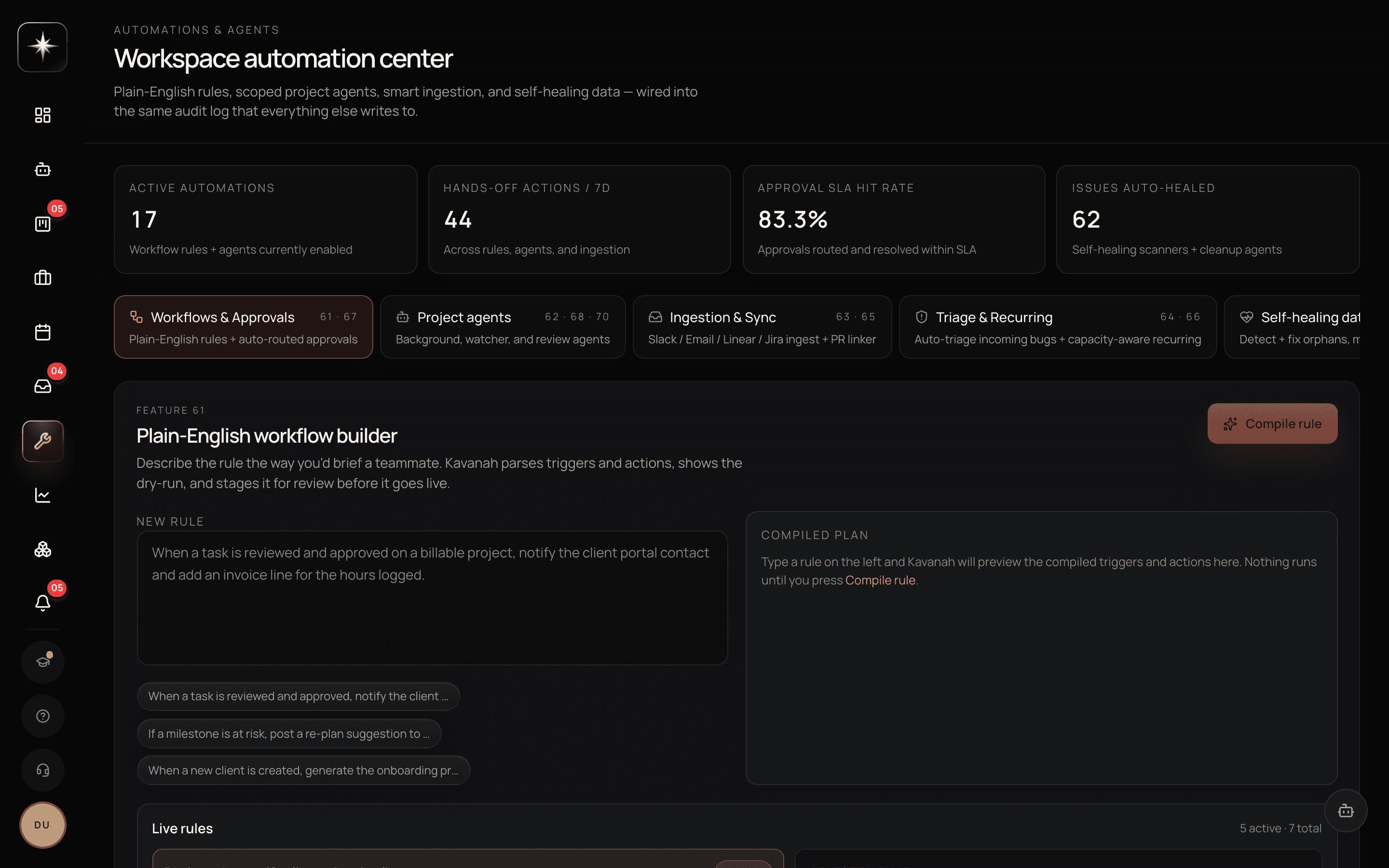
Open Automations under the Build group. The surface is five tabs, and the automation center describes each of them under its own name: Workflows & Approvals is plain-English rules and auto-routed approvals; Project agents holds background, watcher and review agents; Ingestion & Sync covers Slack, Email, Linear and Jira ingest plus the PR linker; Triage & Recurring is auto-triage for incoming bugs and capacity-aware recurring work; and Self-healing data detects and fixes orphaned records. This lesson is mostly about the first.
You do not assemble a rule from dropdowns. The builder takes PLAIN ENGLISH — you describe the rule the way you would brief a teammate, and Kavanah parses the triggers and actions out of it. 'When a task is reviewed and approved on a billable project, notify the client portal contact and add an invoice line for the hours logged' is a rule you can type verbatim.
Press Compile rule and it shows you the compiled plan before anything happens: the triggers and actions it extracted, as a dry run. Nothing runs until you compile, and the rule is staged for review before it goes live. That gap between describing and enabling is the whole safety story of this surface — read the compiled plan, because it is the difference between what you meant and what it heard.
The triggers it understands are events in Kavanah: a task is created, moved between statuses, completed, assigned, or becomes overdue by its due date. The core action is sending a notification — for example, notifying the assignee when a task they own goes overdue.
Save and enable. The rule now runs on that event, without anyone thinking about it.
The rules that reliably earn their keep are the ones that replace a human doing a check: chasing overdue work, notifying someone that they have been assigned something, telling a reviewer that something has arrived in review.
Run history
Every rule has a run history: whether it fired, and when.
Check it after creating a rule. The most common failure with automation is not a rule doing the wrong thing — it is a rule that never fires because the trigger never matches, and there is no error to notice.
This is particularly true of the overdue trigger, which depends on due dates being set and meaningful. A workspace where half the tasks have no due date has an overdue rule that covers half the board and looks like it covers all of it.
So the verification step is the same as everywhere else in this course: confirm the effect, not the configuration.
Automation, scheduled run, or runbook
The choice, restated from Lesson 8.4 because this is where people get it wrong.
Automation is deterministic and event-driven. No model, no judgment, no cost per fire. Reach for it when the rule is simple and the trigger is a Kavanah event.
A scheduled run is time-driven and agentic. Reach for it when you want output on a cadence and producing it requires reasoning.
A runbook is procedure-driven, invoked by a person, with judgment at marked points.
The specific mistake to avoid is using an agent scheduled run for something an automation does perfectly. 'Every morning, check for overdue tasks and notify people' is an automation; implementing it as a daily agent run means paying model costs to do a comparison.
When a rule is a mistake
Two situations.
The process is not settled. A rule encoding how you currently do something is a rule you have to remember exists when you change how you do it — and nobody does. If you have been doing the manual version for less than a month, wait.
The notification is not actionable. A rule that tells people something they cannot act on generates filtering behaviour, and filtering behaviour is not selective: people who filter one Kavanah notification start filtering all of them. Every rule should end with someone able to do something.
When you find a rule in either category, delete it. Disabling is a compromise that leaves the archaeology for the next person; deleting is honest and reversible by rebuilding, which takes two minutes.
Automate one real thing
- 1
Trigger on the due date passing, action to notify the assignee. The canonical example, and it replaces a human chasing.
- 2
A rule that never fires produces no error. Confirm it actually ran before trusting it.
- 3
Check your due-date coverage first
An overdue rule only covers tasks that have due dates. Half a board with dates is half a rule.
- 4
Delete one rule nobody acts on
Non-actionable notifications teach people to filter, and filtering is not selective.
What to watch
- Rules that fired last month
- Share of enabled rules with any run history in the period.
- Healthy signal: All of them. A rule that never fires is either mis-triggered or encoding something that no longer happens.
- Notification actionability
- Whether each rule's notification leads to someone doing something.
- Healthy signal: Always. The moment it does not, you are training people to filter Kavanah in general.
- Due-date coverage
- Share of open tasks with a due date, for workspaces using overdue rules.
- Healthy signal: High, or the rule silently covers a subset while appearing to cover everything.
Key takeaways
- ·Triggers are Kavanah events: created, moved, completed, assigned, overdue.
- ·Check run history after building a rule — a rule that never fires produces no error.
- ·Automation for events, scheduled runs for cadence with reasoning, runbooks for human-invoked procedure.
- ·Do not automate a process you have been running for less than a month.
- ·A non-actionable notification teaches people to filter everything Kavanah sends.
Next: the surface that lets the agent use websites that have no API — the shared cloud browser.