

Module 9 — Connecting Kavanah · Lesson 9.5
The Dev Surface and GitHub
Repos, pull requests, deploys, incidents, issue sync, and spec-to-tasks
What you'll learn
- Connect GitHub by App install or OAuth and select repos
- Read the PR, commit, deploy and incident surfaces
- Use spec-to-tasks to turn a document into a work breakdown
- Set up GitHub Issue sync and know what it keeps in step
Engineering work has its own gravity: it lives in the repository, and any attempt to make engineers maintain a parallel record fails. The Dev surface takes the opposite approach — pull the engineering reality in, so the project view reflects it without anyone double-entering.
Connecting GitHub
GitHub connects from its card on the Integrations tab, and it offers two routes: installing the GitHub App, or signing in with OAuth. Manual entry exists as a fallback.
The App install is the better option where you can use it — it is an explicit, auditable grant on specific repositories rather than a personal token carrying one user's access.
Repo selection happens afterwards, on the Dev surface rather than on the Integrations tab. That catches people out: they connect, see nothing, and assume it failed. Go to Dev and pick your repos.
Once synced, pull requests, commits and deploys appear in the Dev surfaces.
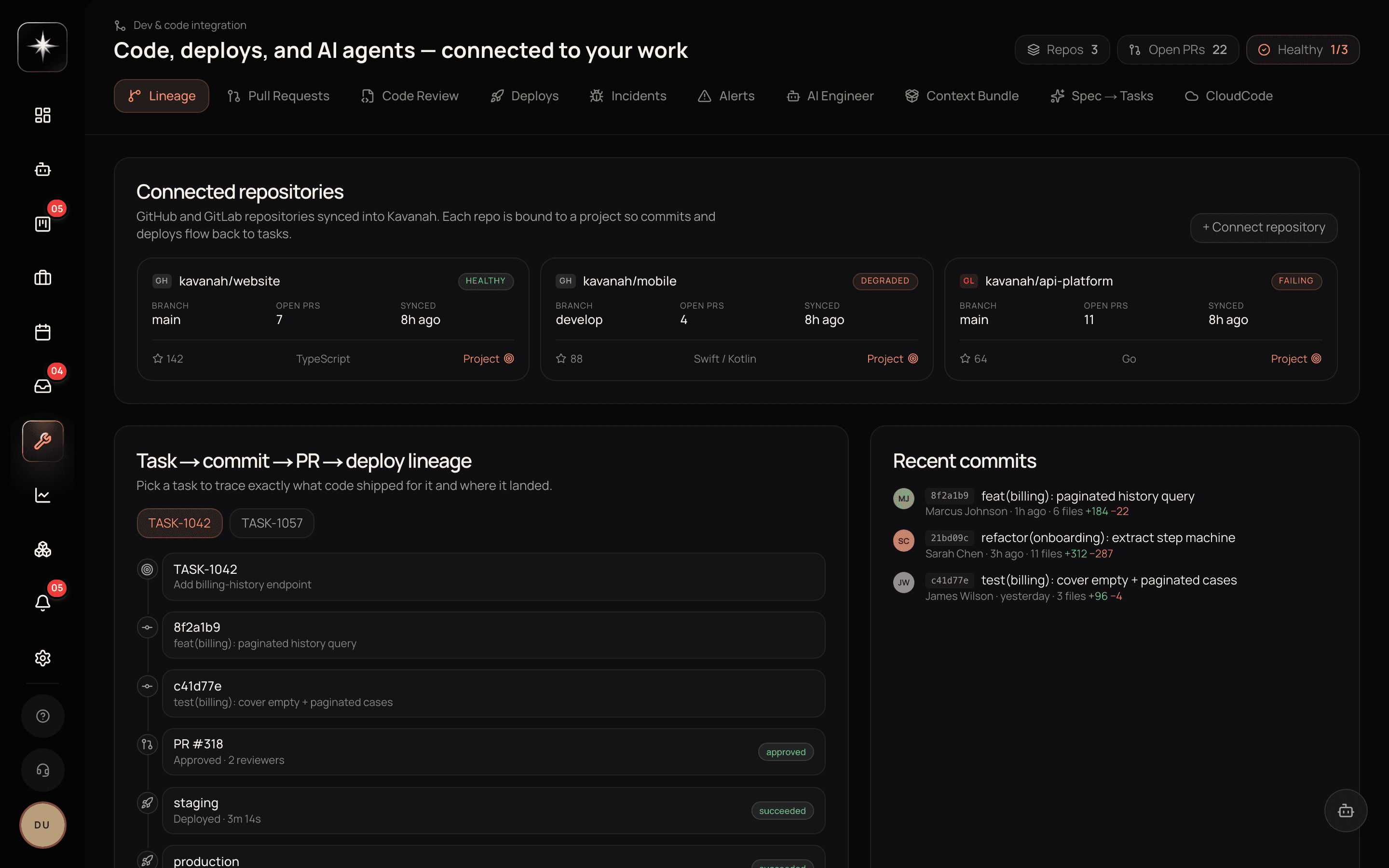
The surfaces
Dev is eleven tabs, which is more than most people discover by clicking. In order: Lineage, Pull Requests, Code Review, Deploys, Incidents, Alerts, AI Engineer, Context Bundle, Spec → Tasks, CloudCode and TRMNLY.
Pull requests and commits are the activity view: what is in flight and what landed. Code Review is the one people miss — it puts inline AI comments directly on the diff, which is a different job from reading the PR list.
Deploys and the timeline show what shipped and when, with deploy markers on the Gantt view. This is the surface that answers 'what changed on the day the numbers moved', which is a question that otherwise takes three people and a chat search.
Incidents and observability alerts are the operational side.
Lineage connects work to what it produced.
And the AI engineer and context bundle are the agentic surfaces — a way to give the agent the repository context it needs to reason about a change. CloudCode is the deployment side of that: projects and one-click deploys. TRMNLY is the hand-off to your own Mac: connect the TRMNLY terminal and you can send one of your tasks to a TRMNLY board, with its context bundle attached, and start Claude Code on it from the same click.
Spec to tasks
This is the feature worth trying first because the payoff is immediate.
Give it a spec — a document describing what should be built — and it produces a task breakdown. You review and edit, and the result is a set of real tasks in a project.
The useful framing is that it is a first draft of a decomposition, not a plan. It will be roughly right about the pieces and roughly wrong about the sizing, and both of those are fine because reviewing a draft is much faster than producing one.
The teams that get the most from it are the ones that treat the review as the actual planning conversation: read the generated breakdown together, argue about what is missing, and edit. The generated list is a prompt for the discussion rather than a substitute for it.
GitHub Issue sync
Kavanah can keep GitHub Issues and Kavanah tasks in step, so an issue filed in the repository becomes a task and stays in sync.
This is worth enabling for teams where non-engineers file work in Kavanah and engineers work from GitHub Issues — which is a very common shape, and one that otherwise produces two lists that diverge within a week.
It is configured alongside the other issue settings. As with any sync, decide which side is the source of truth for which fields, and say so, because a two-way sync where both sides edit the same field is a fight rather than an integration.
What this is not
The Dev surface is not a replacement for your CI system, your monitoring, or your repository host. It is a view that brings their output next to the work.
The value is adjacency. A project whose timeline shows deploy markers, whose tasks link to the PRs that implemented them, and whose incidents sit beside the work is a project you can reason about without opening four tools. That is the whole claim, and it is enough.
Wire up engineering
- 1
Settings → Integrations. Prefer the App over OAuth — it is an explicit, auditable grant per repository.
- 2
Select your repos on the Dev surface
This step is on Dev, not Integrations. It is why people connect, see nothing, and assume it failed.
- 3
Run spec-to-tasks on a real spec
Treat the generated breakdown as a prompt for the planning conversation, not a substitute for it.
- 4
Turn on Issue sync if engineers work from GitHub
Decide which side owns which fields first. A two-way sync with no owner is a fight.
What to watch
- PR-to-task linkage
- Share of merged pull requests connected to a task.
- Healthy signal: High for planned work. Unlinked PRs are work that happened outside the plan, which is worth knowing.
- Deploy-to-incident proximity
- How often an incident follows shortly after a deploy, visible on the timeline.
- Healthy signal: Whatever is true — the point is being able to see it, which is what the deploy markers are for.
- Issue sync divergence
- How often a synced issue and its task disagree on a field.
- Healthy signal: Never. Divergence means both sides own the same field and nobody decided which wins.
Key takeaways
- ·Connect GitHub by App install where possible; repo selection happens on Dev, not Integrations.
- ·Deploy markers on the timeline answer 'what changed the day the numbers moved'.
- ·Spec-to-tasks produces a first draft of a decomposition — review it as the planning conversation.
- ·Issue sync keeps GitHub Issues and tasks in step; decide field ownership before enabling it.
- ·Dev is adjacency, not a replacement for CI, monitoring or your repo host.
Last in this module, and the one nobody plans for: keeping connections alive.