

Module 6 — Knowledge and Thinking Tools · Lesson 6.1
The Knowledge Base
Documents, decisions, the glossary, retros and playbooks — plus the AI decision detector
What you'll learn
- Organize documents so they can be found rather than only stored
- Record decisions in a form that answers 'why' in six months
- Review AI-suggested decisions and accept or dismiss them
- Use onboarding playbooks to make joining a team a document rather than a conversation
Every team has a knowledge base and most of them are write-only. The difference between one that gets read and one that does not is almost never the tool — it is whether the documents answer questions people actually have. Kavanah's has a few document types aimed specifically at the questions that recur.
Documents
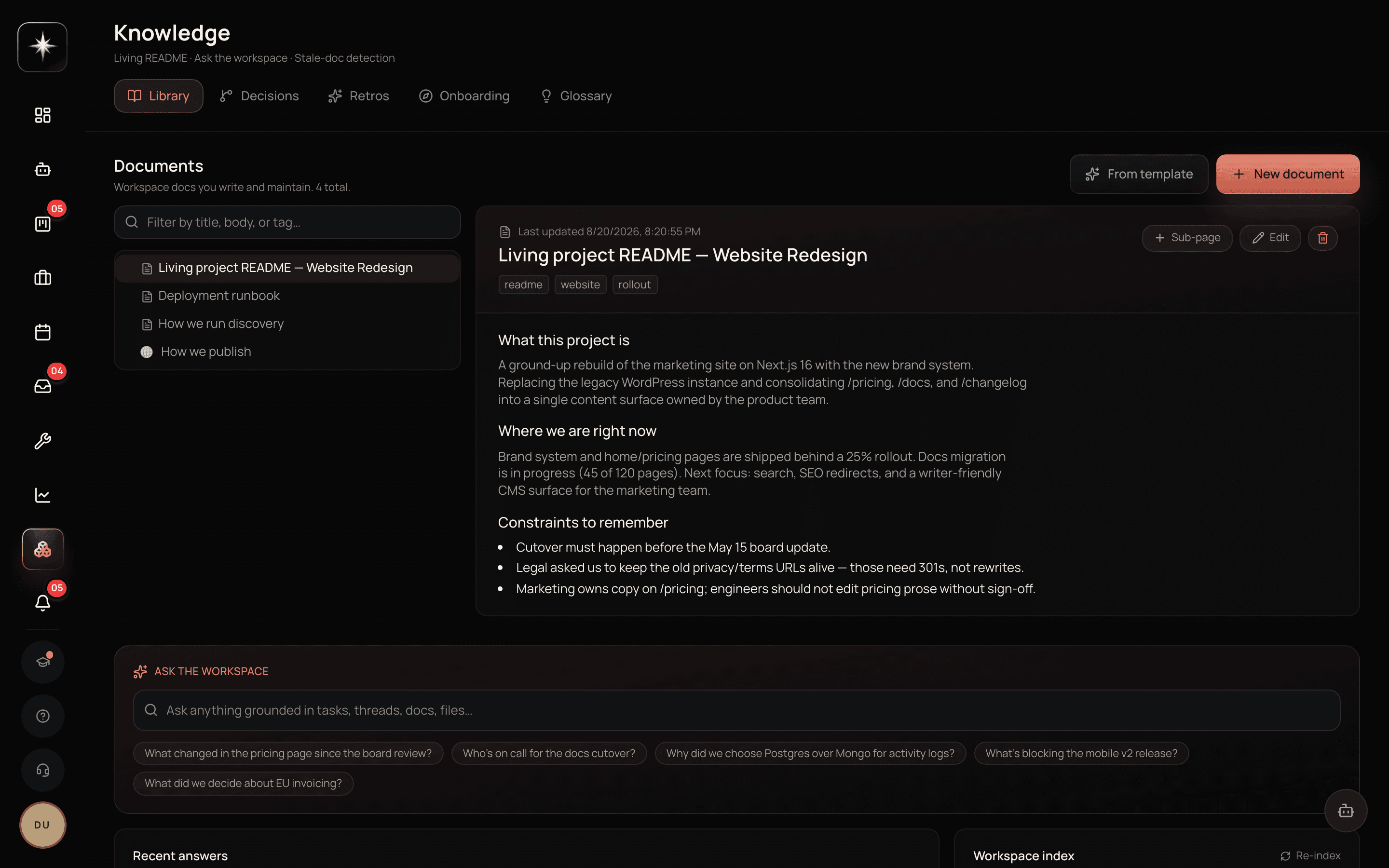
Open Knowledge under the Workspace group. Documents nest, so you can have a real structure rather than a flat list.
The advice that matters most here is about titles. A document called 'Deployment' is unfindable in a year because you will search for what you want to know, not for the topic. 'How to deploy to production' is findable, and it also constrains the document to actually answer that.
The agent reads the knowledge base. That is a second reason to write titles as questions and content as answers: when someone asks the agent how to deploy, the retrieval works far better against a document that is structured as an answer than one structured as a topic dump.
Decisions
The Decisions tab records decisions in the architecture-decision-record tradition: what was decided, in what context, and what the consequences are.
This is the document type most teams skip, and the one that pays back most. The question a knowledge base is asked most often in a mature team is not 'how does this work' — that is usually discoverable from the thing itself — it is 'why is it like this', and the answer is a decision that nobody wrote down.
A good decision record is short. What we decided. What we were choosing between. Why we picked this. What we gave up. Four paragraphs. The thing that makes it valuable is the third and fourth: the reasoning and the trade-off. A record that says only what was decided tells a future reader nothing they could not see from the code.
The decision detector
Kavanah scans documents, meetings and conversations for decision-shaped statements and files them as suggested decisions on the Decisions tab. It scans automatically as documents are edited, and nudges you with an alert when suggestions are waiting.
Each suggestion is reviewed by a human — accept it as a decision record, or dismiss it. You can also run a scan on demand from the suggestions panel.
This solves the real problem with decision records, which is not that people disagree they are useful but that nobody writes them at the moment the decision happens. Having a draft appear that you edit and accept is a much lower bar than writing one from nothing.
The nudge is a toggle under Settings → AI Agent. Turn it on if you want the reminder; leave it off if you would rather work the tab on your own cadence.
Glossary, retros and playbooks
The glossary is for terms your team uses that a newcomer would not know — internal names, acronyms, the customer segment you call something odd. It is a small document type with a disproportionate effect on how fast new people become useful, and the agent uses it too, which means it stops mistranslating your internal vocabulary.
Retros record what you learned. The failure mode is a retro nobody reads afterwards; the fix is to link the actions out of the retro into real tasks, so the learning has a mechanism rather than a paragraph.
Onboarding playbooks are role-based: what a new designer, engineer or account manager needs in their first fortnight. Writing one is a couple of hours and it converts every future onboarding from a conversation into a document plus a conversation, which is strictly better.
Make the knowledge base readable
- 1
Retitle three documents as questions
'Deployment' becomes 'How to deploy to production'. Better for humans searching and better for the agent retrieving.
- 2
What we decided, what we were choosing between, why, and what we gave up. The last two are the valuable ones.
- 3
Review the suggested decisions
The Decisions tab. Accepting an edited draft is a much lower bar than writing one from nothing.
- 4
For the role you hire most. Two hours once, saved on every future joiner.
What to watch
- Decision record count
- How many decisions have been recorded, and how recently.
- Healthy signal: Growing steadily. A knowledge base with fifty how-to documents and two decisions cannot answer the question it is asked most.
- Suggestion review latency
- How long AI-suggested decisions wait before someone accepts or dismisses them.
- Healthy signal: Days, not months. An unreviewed suggestions queue becomes another backlog nobody faces.
- Retro-to-task conversion
- Share of retro actions that became real tasks.
- Healthy signal: High. A retro whose actions stay in the document is a retro that changed nothing.
Key takeaways
- ·Title documents as the questions people will ask — it helps humans search and the agent retrieve.
- ·Decision records answer 'why is it like this', the question a mature team asks most.
- ·The detector drafts decisions from documents and conversations; a human still accepts each one.
- ·The glossary stops both newcomers and the agent mistranslating your internal vocabulary.
- ·Convert retro actions into tasks or the retro changed nothing.
Next: the surfaces for thinking in shapes rather than sentences — whiteboards and mind maps.