

Module 11 — Running the Workspace · Lesson 11.1
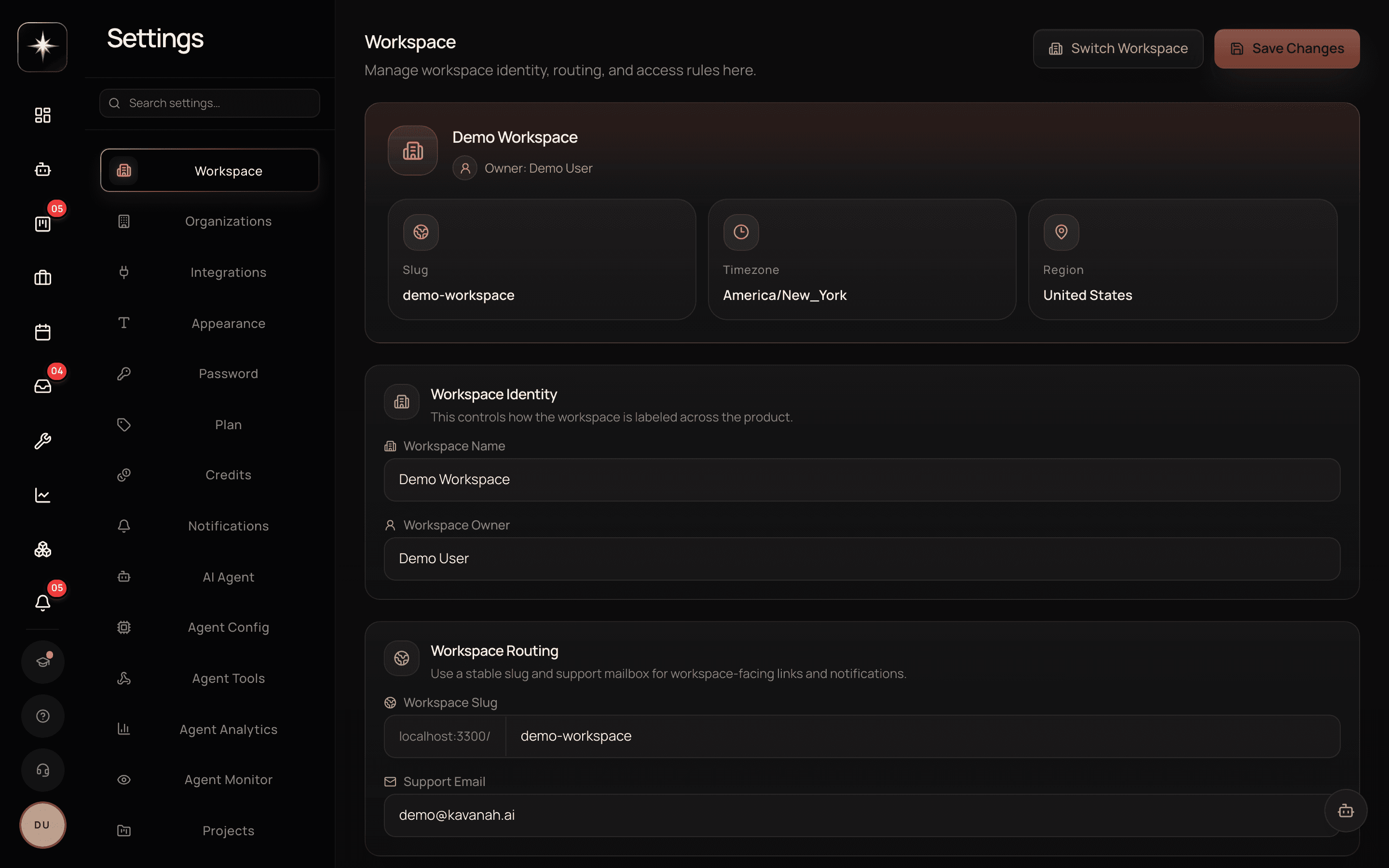
The Settings Map
Every tab, what it controls, and which ones are worth visiting before you need them
What you'll learn
- Navigate the settings sidebar and know what each area controls
- Identify the tabs that are worth configuring before you need them
- Find the account-level pages that are not tabs
- Recognize the danger zone and what belongs there
Nobody reads a settings page end to end, which means most workspaces have several things unconfigured that they would have configured if they knew about them. This is the map — not a how-to for each, since most have their own lesson, but enough to know what exists.
The workspace group
Workspace covers the basics: name, identity, and the settings that describe the organization.
Organizations handles multi-organization structure where you have it.
Projects carries project-level defaults.
Custom Statuses and Custom Properties define your board columns and your task fields — Lesson 2.5.
Permissions is the role matrix: what each role can do. Worth reading once before you hand out admin.
Member lifecycle and Onboarding govern what happens when people join and leave. These are the tabs most workspaces never open and then wish they had, because the defaults are reasonable and the customization is where you encode your actual process.
The agent group
Five tabs, covered across Module 8.
Agent is the default behaviour, including the autonomy ceiling and your own opt-in.
Agent Config is model and configuration.
Agent Tools is custom tools — webhook-backed capabilities you define, distinct from marketplace apps.
Agent Analytics is aggregate usage. Agent Monitor is what is running and what failed.
The opt-in feature switches live here too: task capture, community app tools, the remote browser, exec meetings, the decision-suggestion nudge. All of them default off, and all of them are worth a deliberate decision rather than being discovered by accident.
Money, connection and delivery
Plan and Credits is billing — the per-seat subscription and the usage credits bought on top. Lesson 11.2.
Integrations is the provider cards — Module 9.
Notifications is delivery preferences and do-not-disturb — Lesson 4.6.
Appearance is theme and visual preferences. Small, but the density setting is genuinely worth trying if you work on a large board.
Admin alerts is where operational alerting is configured, and it is worth setting to reach a real person rather than a shared address.
Access, recovery and the danger zone
Directory sync is SCIM provisioning and verified-domain auto-join — Lesson 11.4.
API Keys mints and revokes programmatic access — Lesson 10.5.
Privacy carries data-handling settings.
Trash recovers recently deleted tasks, projects, clients and members — Lesson 11.5.
Weekly check-ins and Call recording are feature-level settings for those capabilities.
And the danger zone is what it sounds like: the workspace-ending operations. It is separated because the actions there are not reversible by any of the recovery mechanisms elsewhere in this list.
The account pages
Some things are about you rather than the workspace, and they live on their own routes rather than as tabs.
Security is password, two-factor and sessions.
Accounts is linked sign-in providers.
Audit logs is the durable record of what happened in the workspace.
Bug reports and Feature requests are where feedback goes.
And Issue Configuration — issue types, resolutions, components, versions, project keys — has no link anywhere and is reached by URL. It is the single most findable-by-accident-never surface in the product.
What to configure before you need it
Five, in order.
The agent autonomy ceiling and action policies. Leaving these at defaults is a decision; making it deliberately is better.
Admin alerts, pointed at a person who reads them.
The invite policy, before the workspace grows past the point where you would notice an unexpected member.
Notification delivery, including actually testing that push arrives.
And custom statuses, before your team has built habits around columns that do not match the process.
Everything else can wait until it comes up.
Walk the settings
- 1
Open Settings and read the sidebar
Five minutes. The goal is knowing what exists, not configuring it.
- 2
Check every opt-in agent switch deliberately
Task capture, community app tools, remote browser, exec meetings. All default off; decide each rather than discovering it.
- 3
Point admin alerts at a real person
A shared address nobody opens is the same as no alerting, but it feels like coverage.
- 4
Find Issue Configuration by URL
It has no link anywhere. Knowing it exists is most of the value.
What to watch
- Deliberate-configuration coverage
- How many of the opt-in switches have been decided rather than left at their default by omission.
- Healthy signal: All of them. A default is a fine answer; not knowing it was a question is not.
- Alert reachability
- Whether admin alerts land somewhere a human reads.
- Healthy signal: Always. This is the setting whose failure is invisible until the day it mattered.
Key takeaways
- ·Settings spans workspace config, five agent tabs, billing, integrations, notifications, access, recovery and the danger zone.
- ·Every opt-in agent feature defaults off and lives under the agent tabs.
- ·Security, Accounts, Audit logs and Issue Configuration are separate routes, not tabs.
- ·Configure autonomy, admin alerts, invite policy, notification delivery and custom statuses before you need them.
- ·The danger zone holds actions no recovery mechanism elsewhere in Settings can undo.
Next: the tab everyone eventually visits — plans, seats and credits.