
Module 2 — Projects and Tasks · Lesson 2.6
My Work
Your private notes, reminders and to-dos — the things that are yours and not the team's
What you'll learn
- Use My Work for the work that should not be on anyone's board
- Tell the difference between a personal to-do and a workspace task, and pick correctly
- Set up the daily digest so your queue arrives by email
- Establish a start-of-day and end-of-day routine on this surface
Boards are for teams. They show the whole flow, which is exactly what you want when you are running the work and exactly what you do not want when you are doing it. My Work is the other view: everything assigned to you, across every project, in one place, with room for the personal scaffolding that does not belong on a shared board.
What is on it
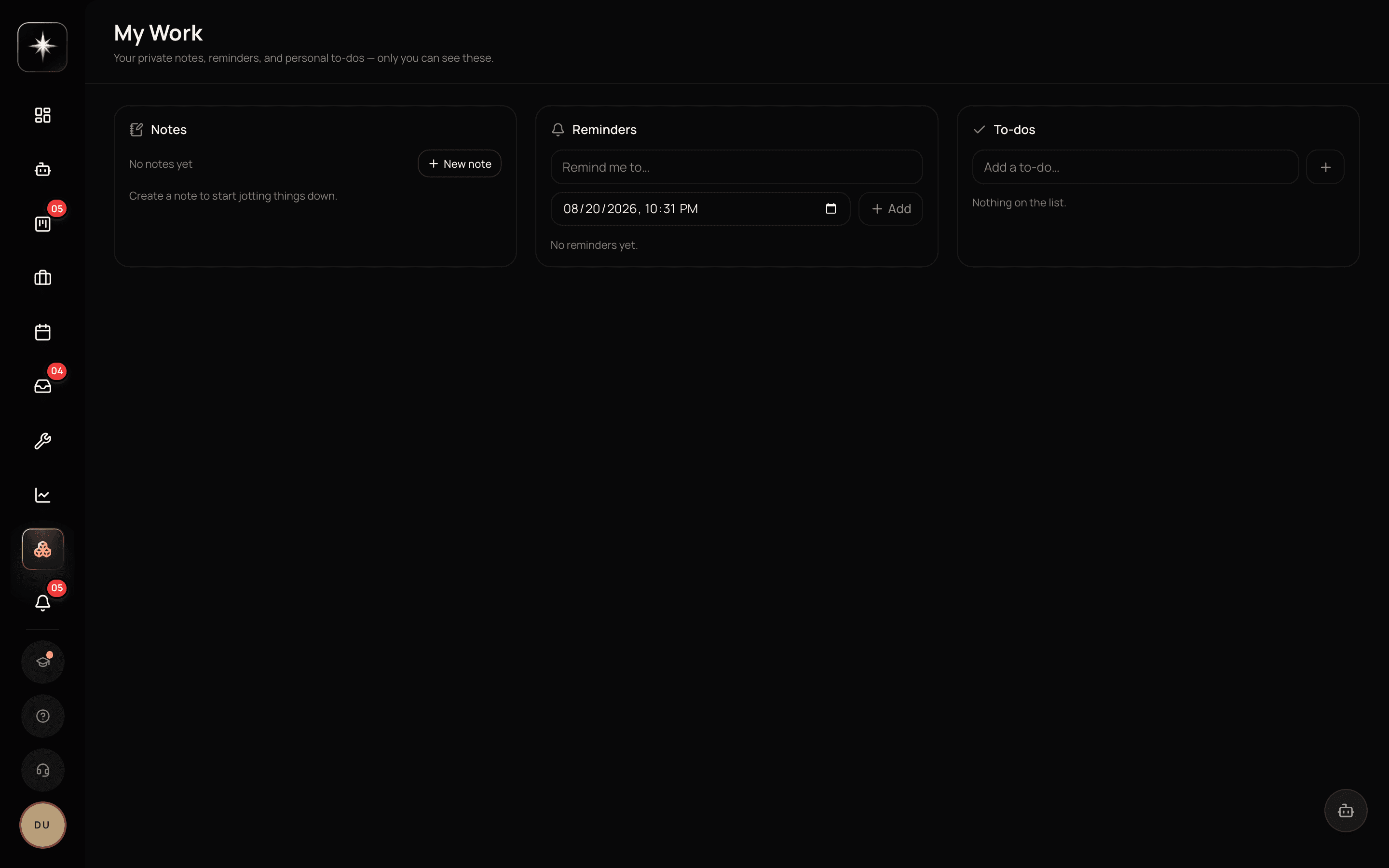
Three cards, and that is the whole surface: a notepad, reminders, and personal to-dos. Every one of them is private. They are not tasks on anyone's board, they do not show up in team reporting, and nobody else sees them — the page says so in its own subtitle.
What is NOT here is your assigned work. My Work does not list tasks at all. For the cross-project view of what is assigned to you, use the Urgent Tasks card on the dashboard, or filter a board by assignee.
That distinction is deliberate and worth using properly. 'Reply to Sarah about the invoice' is a personal to-do — it takes four minutes, nobody needs to see it, and putting it on the team board is noise. 'Rework the invoicing flow' is a task — it has an owner, a state, and someone will ask about it. Putting the first on the board makes the board unreadable; putting the second in your notepad makes it invisible.
How it relates to the board
My Work is a separate store, not a view. Nothing on it is a task, nothing syncs to a board, and finishing a to-do here changes nothing anyone else can see. That is the feature, not a limitation.
The board is arranged by state, which is the right arrangement for asking where work is stuck, and everything on it is shared by construction. My Work is the opposite: it is the place for the things that would make a board unreadable if you put them there.
The practical consequence: you do not need to keep a private copy. The reason people keep private copies of their work is usually that the shared board is too noisy to find themselves in — and the answer to that is this page, or the assignee filter on the board, not a second list that immediately drifts.
Pairing it with the daily digest
Kavanah's report library includes My Daily Digest — a personalized report of what you should work on today. It can be generated on demand from Reports, and it can be scheduled to email you every morning.
That pairing is what makes the surface a routine rather than a page you sometimes open. The digest arrives before you start; it tells you what is due, what is overdue, and what changed. You open My Work having already decided what today is.
Setting it up takes a minute from the Reports schedules tab — or you can just ask the AI agent to email you every morning what you should work on, and it will create the schedule for you. One caution when doing it manually: schedule cadences are expressed in UTC, so convert your local time rather than typing the hour you want.
A routine that survives busy weeks
Start of day: read the digest, open My Work, pick the two or three things that are actually today. Move them to a working status so the board reflects reality — this is the step people skip, and it is the step that makes the team board worth reading.
End of day: close what is done, and for anything you thought would finish and did not, change the due date or say why in a comment. Both take seconds and both prevent the slow drift where the board stops describing the world.
Once a week: look at everything assigned to you that you have not touched. That set is the honest picture of what you have accepted and are not doing, and it is the input to a conversation with whoever assigned it — which is a much better outcome than the task quietly going stale.
Make it your home page
- 1
Open My Work and see what is actually there
Three private cards — notes, reminders, to-dos — and no task list. Knowing that saves you looking here for your assigned work.
- 2
Move your personal to-dos off the team board
Anything that takes four minutes and nobody needs to see belongs in the notepad or to-dos here, not as a card.
- 3
Reports → Schedules, or just ask the agent to email you every morning what you should work on. Cron cadences are UTC — convert your local time.
- 4
Clear the to-dos you finished here, then close or re-date the real tasks on the board. Two minutes, and it is what keeps the board honest.
What to watch
- Untouched assigned tasks
- Tasks assigned to you with no activity in the last two weeks.
- Healthy signal: Close to zero. A growing set is work you have accepted and are not doing, and it needs a conversation rather than a nudge.
- Board-reality gap
- How often what you are actually working on matches what the board says is in progress.
- Healthy signal: Most days. When they diverge, every downstream number — cycle time, capacity, the digest — is describing a fiction.
- Digest open rate
- Whether you actually read the morning digest.
- Healthy signal: If you do not, unschedule it. An ignored recurring email trains you to ignore Kavanah's email in general.
Key takeaways
- ·My Work is the only cross-project view of what you personally have to do.
- ·Personal to-dos and notes belong here; work anyone will ask about belongs on the board.
- ·It is a view, not a second store — there is no reason to keep a private copy.
- ·Pair it with the scheduled daily digest so the day is decided before you open the app.
- ·The end-of-day pass is what keeps the board describing the actual world.
One more surface in this module, and it is the one that decides whether AI-captured work helps or drowns you: the triage queue.