

Module 2 — Projects and Tasks · Lesson 2.7
The Triage Queue
Turning on task capture, working the queue, and the four questions each candidate has to survive
What you'll learn
- Turn on task capture and explain why it is off by default
- Work the triage queue using the four-question test
- Dismiss with a reason, and understand what the reasons are for
- Recognize the failure mode of capture without triage
Work is agreed to in conversation and then lost between the conversation and the tracker. That gap is where most of a team's dropped commitments live, and it is not a discipline problem — it is a transcription problem. Kavanah's answer is to do the transcription automatically and put a human in front of the result. Both halves matter, and the second half is the one teams skip.
What capture does, and why it is opt-in
When task capture is on, Kavanah reads the conversations it has access to — chat, agent conversations, meeting content, threads — and proposes task candidates from statements that look like commitments. Those candidates go to the Triage queue at Workspace → Triage. They are not tasks. Nothing appears on anyone's board until a human accepts.
Capture is off until an admin turns it on. That is the general pattern for anything in Kavanah that acts automatically or spends credits, and it applies here for both reasons: capture is model work, and it produces things in your workspace without anyone asking.
An admin can turn it on from the Triage page itself when it is off, or from Settings → AI Agent.
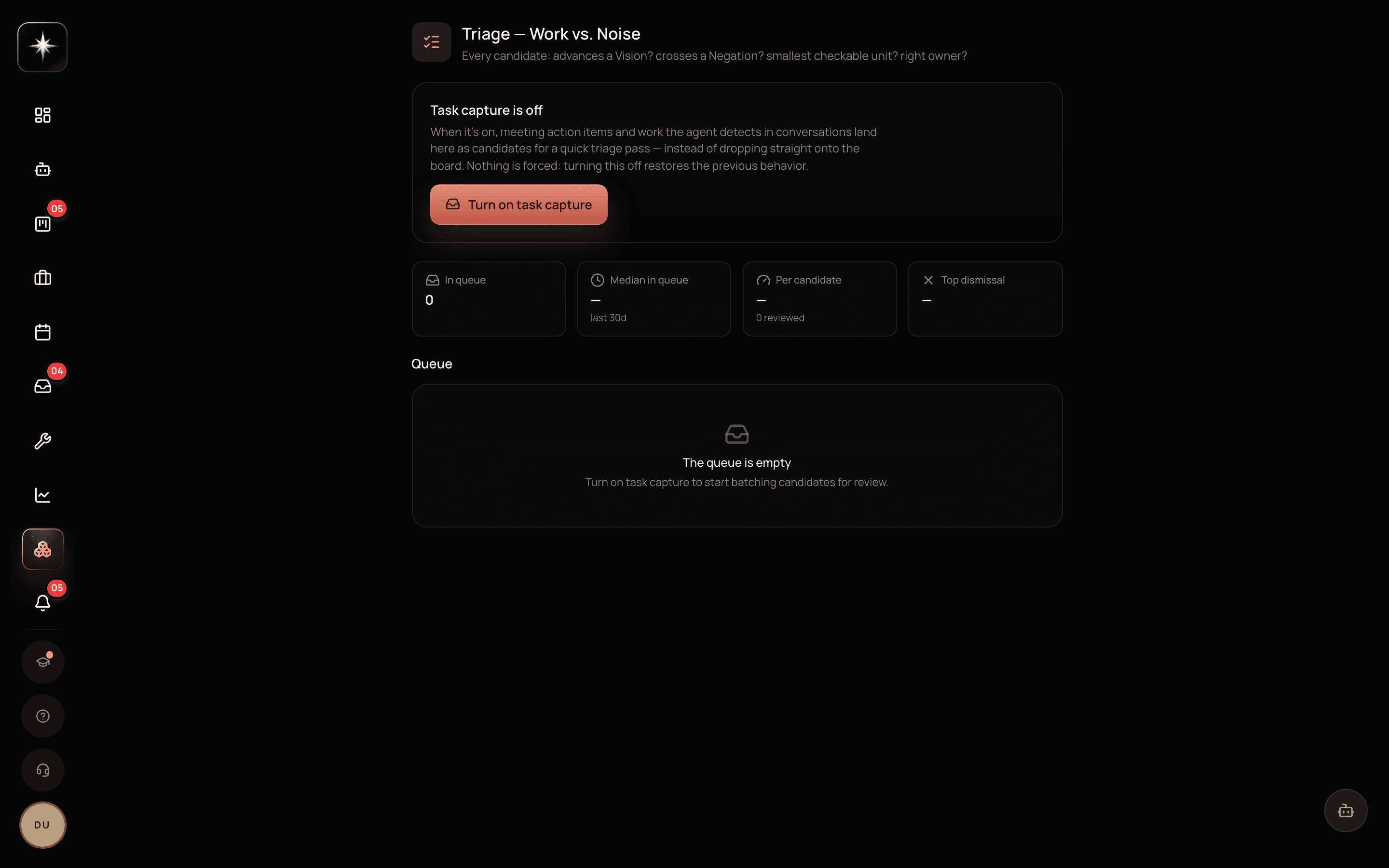
The four questions
Each candidate is judged against four questions, and they are worth internalizing because they are also a good test for tasks you write by hand.
Does it advance a Vision? If the work does not move the workspace or project towards its stated end-state, accepting it is choosing to spend the team on something you have not decided matters.
Does it cross a Negation? The charter's hard nos. A candidate that crosses one should be dismissed, and the fact that something in a conversation proposed it is worth noticing.
Is it the smallest checkable unit? A candidate that says 'improve onboarding' is not a task, it is a topic. Edit it into something you could tell was done, or dismiss it.
Is there a right owner? Work with no plausible owner is work that will sit. If you cannot name one at triage, you will not name one later.
A candidate that survives all four becomes a real task. Most will not, and that is the queue working correctly rather than failing.
Accept, edit, dismiss
Three actions per candidate.
Accept creates the real task in the project you choose. Use it when the candidate is already right.
Edit-then-accept is the common case. The captured title is usually close and rarely exactly what you want; fixing it takes seconds and produces a task that reads like a task rather than a transcript.
Dismiss removes it, with a reason. The reason is not bureaucracy. Dismissal reasons are aggregated on the triage metrics, and the distribution is genuinely informative: a queue dominated by 'not actually work' means capture is over-triggering and the conversations it is reading are chattier than it assumed. A queue dominated by 'already tracked' means your team is discussing work that already has a task, which is fine. A queue dominated by 'crosses a Negation' is a signal worth escalating, because it means people are repeatedly proposing work the workspace has said no to.
The rule that decides whether this helps
Do not turn capture on until someone has agreed to work the queue.
Capture without triage produces a queue that grows monotonically. Within a fortnight it has a few hundred items, nobody can face it, and someone declares bankruptcy and clears it — which throws away the real commitments along with the noise, and teaches everyone that the feature does not work.
Working the queue takes a few minutes a day when done daily and an hour when done fortnightly, which is the usual shape of this kind of chore. Assign it to a person, not to the team. Put it in the same slot as the morning digest.
The metrics on the triage page — queue size, time in queue, accepted versus dismissed, and the reason distribution — exist so you can tell whether this is happening without asking.
How it relates to the rest of the product
Triage is upstream of the board: it is where work enters. That makes it the highest-leverage place to enforce a standard, because a task that enters badly stays bad for its whole life.
It is also the surface where the charter earns its keep in the most visible way. The Negation question is not advisory here — the agent's task-creating tools are gated on the workspace charter, so work that crosses a Negation is refused at creation with the line that refused it, and logged in the 'what we said no to' ledger on the KVN page.
And it is a good early read on whether your conversations are happening where the product can see them. An empty queue in a busy team usually means the discussion is elsewhere.
Set up triage properly
- 1
Decide who owns the queue before turning capture on
One named person, a few minutes a day. Without this, do not enable it — an unworked queue is worse than no capture.
- 2
Admins get a one-click enable on the Triage page when it is off; it is also under Settings → AI Agent.
- 3
Work the queue with the four questions
Advances a Vision? Crosses a Negation? Smallest checkable unit? Right owner? Edit-then-accept is the common case.
- 4
Read the dismissal-reason distribution weekly
It tells you whether capture is over-triggering, whether work is being double-tracked, or whether people keep proposing work the charter has refused.
What to watch
- Queue size
- Number of untriaged candidates waiting.
- Healthy signal: Small enough to clear in one sitting. A monotonically rising queue is the signature of capture running without triage, and it ends in bankruptcy.
- Time in queue
- How long a candidate waits before someone judges it.
- Healthy signal: Under a day or two. A commitment captured on Monday and triaged the following week has usually already been dropped or done.
- Accept rate
- Share of candidates accepted rather than dismissed.
- Healthy signal: A genuine mix. Near-zero means capture is misfiring; near-total means the queue is being rubber-stamped and the four questions are not being asked.
Key takeaways
- ·Capture proposes; a human accepts. Nothing reaches a board without a person.
- ·It is off by default because it both acts automatically and spends credits.
- ·Four questions: advances a Vision, crosses a Negation, smallest checkable unit, right owner.
- ·Dismissal reasons aggregate into a diagnostic — read the distribution, not just the count.
- ·Never turn capture on before someone has agreed to work the queue daily.
That completes the core of the product. Module 3 moves outward: the people in your workspace, what they can see, and the clients and deals on the other side of the work.