

Module 3 — People, Clients and Deals · Lesson 3.4
The Deal Room
Pipelines, stages, the board and list views, and follow-up cadences that stop on a reply
What you'll learn
- Create and move deals across a pipeline in either view
- Manage stages for a pipeline, and understand why that is admin-only
- Build a follow-up cadence and enroll a contact
- Read follow-up staleness as the pipeline's real health signal
A pipeline in a project-management tool is only worth having if it is where the selling actually happens rather than a summary someone updates on Fridays. Kavanah's Deal Room is built for the first: you can work a deal from it, send the follow-ups from it, and see what has gone quiet without asking anyone.
Deals, pipelines and the two views
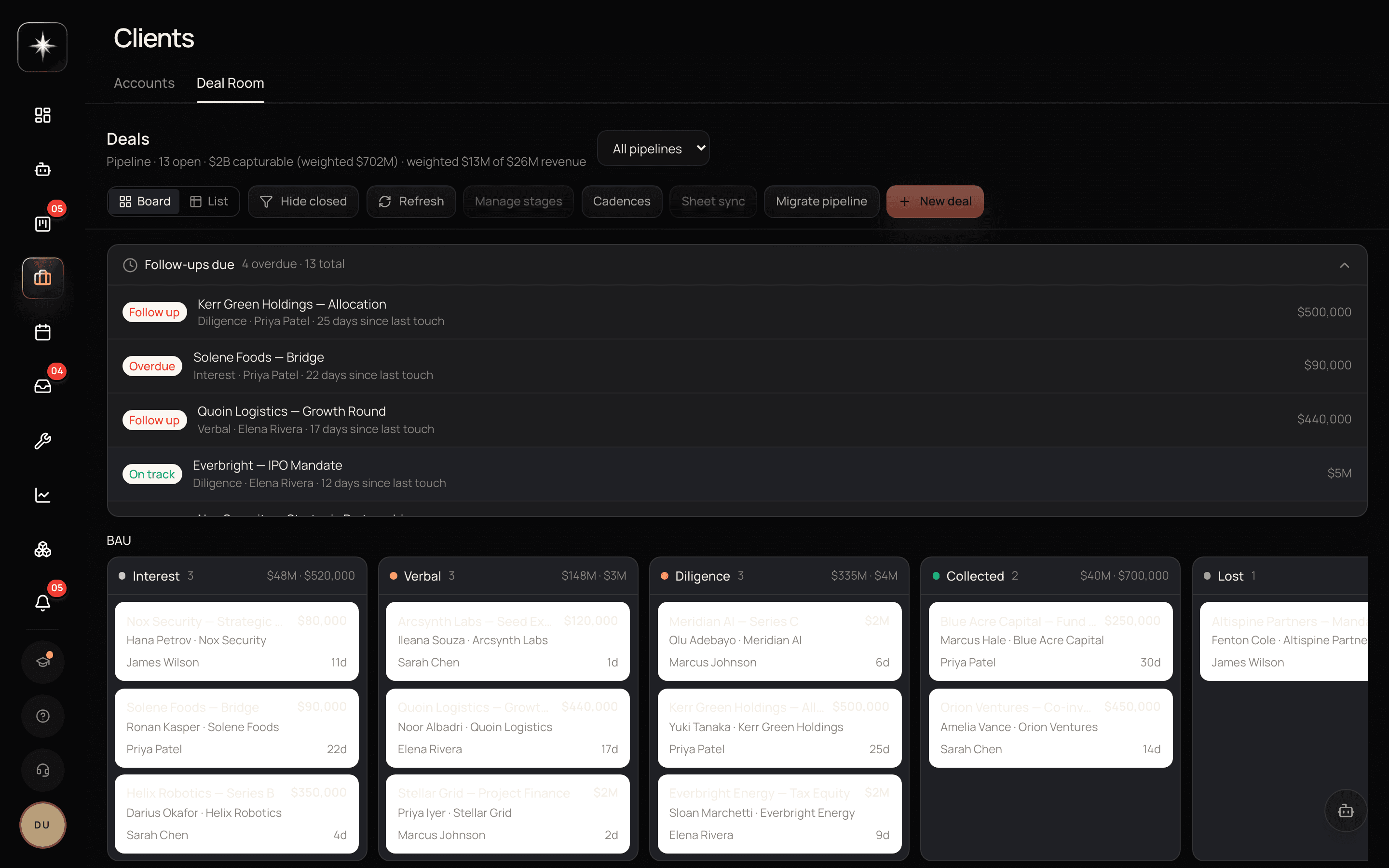
The Deal Room is the Deal Room tab on Clients. A deal carries a stage, an amount and revenue, a probability, an owner and a closer, linked contacts, and a follow-up staleness signal.
Two views, toggled in the header. Board is kanban by stage — drag a card to move it, which is the fastest way to run a pipeline review. List is an editable spreadsheet: press Edit and change stage, owner, amount, revenue, probability, close date and notes inline, which is the fastest way to do a bulk update.
The pipeline selector lets you look at one pipeline or at All pipelines at once. Separate pipelines are how you keep, say, new business and renewals from being averaged into one meaningless funnel.
Create a deal with New deal; open any deal for its contacts and its activity timeline.
Stage management
Stages are per pipeline and managed by admins, with a single pipeline selected, through Manage stages.
The admin restriction is not arbitrary. Stages are the pipeline's shared vocabulary and the axis every pipeline number is computed along; letting anyone reorder them mid-quarter means the previous quarter's numbers are about a different funnel. Change them deliberately, and preferably at a period boundary.
When designing stages, the same handoff test from the task board applies: a stage should be a real change in what the deal is waiting on. 'Interested' is a feeling. 'Proposal sent' is a fact, and it is one you can measure the time out of.
Follow-up cadences
A cadence is a reusable email sequence: a series of follow-ups on a schedule, defined once and reused across deals. Admins define them with the Cadences button; you enroll a contact from a deal's panel.
Two properties make them different from a generic drip tool.
They send under YOUR name, from your connected mailbox — not from a marketing system. The recipient replies to you and the reply lands in your inbox.
And a reply from the contact stops the remaining steps automatically. That is the property that makes cadences safe to use on real prospects: the failure mode of sequence tools, where someone replies and then receives three more scheduled nudges, cannot happen.
Use them for the follow-ups you would send anyway and keep forgetting. Do not use them as a substitute for a real message when a deal is live — a cadence is for maintaining contact through a quiet stretch, not for conducting a negotiation.
Staleness, and what to actually watch
Every deal carries a follow-up staleness signal: how long since anything happened on it.
This is the single most useful number on the surface, and it is the one most pipeline reviews ignore in favour of stage counts. A pipeline with forty deals in Proposal Sent looks healthy on a board and is a graveyard if thirty of them have not been touched in six weeks. Staleness is what distinguishes the two.
Run the pipeline review off staleness first and stage second. The question 'what has gone quiet?' produces actions; the question 'how many are in each stage?' produces a number.
What the agent can do here
The AI agent has deal-room capabilities: it can read the pipeline, summarize it, propose follow-ups, and enroll contacts in cadences.
The governance around that matters and is covered properly in Module 8, but the short version is that anything that sends an email to a person outside your workspace is an external send, which by default is parked for your explicit approval rather than executed. The agent will draft and queue; you approve. That is the intended shape, and it is why 'have the agent chase the quiet deals' is a reasonable thing to ask for rather than a reckless one.
Run a real pipeline
- 1
Open the Deal Room and switch between Board and List
Board for the review, List for bulk edits. The toggle is in the header, next to the pipeline selector.
- 2
Design your stages against the handoff test
Admins, single pipeline selected, Manage stages. Each stage should be a fact about what the deal is waiting on, not a feeling about it.
- 3
Build one cadence and enroll one contact
Admins define cadences; enroll from the deal's panel. Emails go out under your name and stop when they reply.
- 4
Sort by staleness and act on the top ten
This is the pipeline review that produces actions rather than a stage-count report.
What to watch
- Follow-up staleness
- Days since the last activity on each open deal.
- Healthy signal: Most of the pipeline touched inside a fortnight. This is the number that separates a live pipeline from a board of hopeful cards.
- Stage dwell time
- How long deals sit in each stage before moving.
- Healthy signal: No single stage dominating. A stage that everything piles up in is where your sales process actually breaks.
- Cadence reply rate
- Share of cadence enrollments that end because the contact replied rather than because the sequence finished.
- Healthy signal: Meaningfully above zero. A cadence that runs to completion every time is a sequence nobody is reading.
Key takeaways
- ·Board view for the pipeline review, List view with inline Edit for bulk updates.
- ·Stages are per pipeline and admin-managed because they are the axis every pipeline number is computed along.
- ·Cadences send under your name from your mailbox and stop automatically when the contact replies.
- ·Staleness, not stage count, is the number that tells you whether the pipeline is alive.
- ·Agent-sent follow-ups are external sends and park for your approval by default.
Next: keeping all of this in step with the spreadsheet your team may not be ready to give up — Google Sheet sync for deals and accounts.