

Module 5 — Time, Planning and Insight · Lesson 5.4
The Portfolio
Programs, objectives, budgets, forecasts — and the Resources tab everything else depends on
What you'll learn
- Group projects into programs and connect them to objectives
- Track a budget and read the forecast against it
- Request and record team availability on the Resources tab
- Read allocation to find the person who is committed twice
Most teams do not need a portfolio view until suddenly they do — usually the first time someone asks a question that spans projects and nobody can answer it without a spreadsheet. This is that surface, plus one tab that everything else in Module 5 depends on.
Programs and objectives
A program groups projects that serve the same larger goal. An objective is the outcome those projects are supposed to produce.
The reason to bother is that projects are the wrong unit for a leadership question. 'How is the platform migration going' spans four projects; asking about each one separately produces four statuses and no answer. A program rolls them up.
Keep the hierarchy shallow. Projects into programs, programs against objectives, and stop. Every additional layer is a level someone has to maintain, and the marginal insight from the fourth level is close to zero.
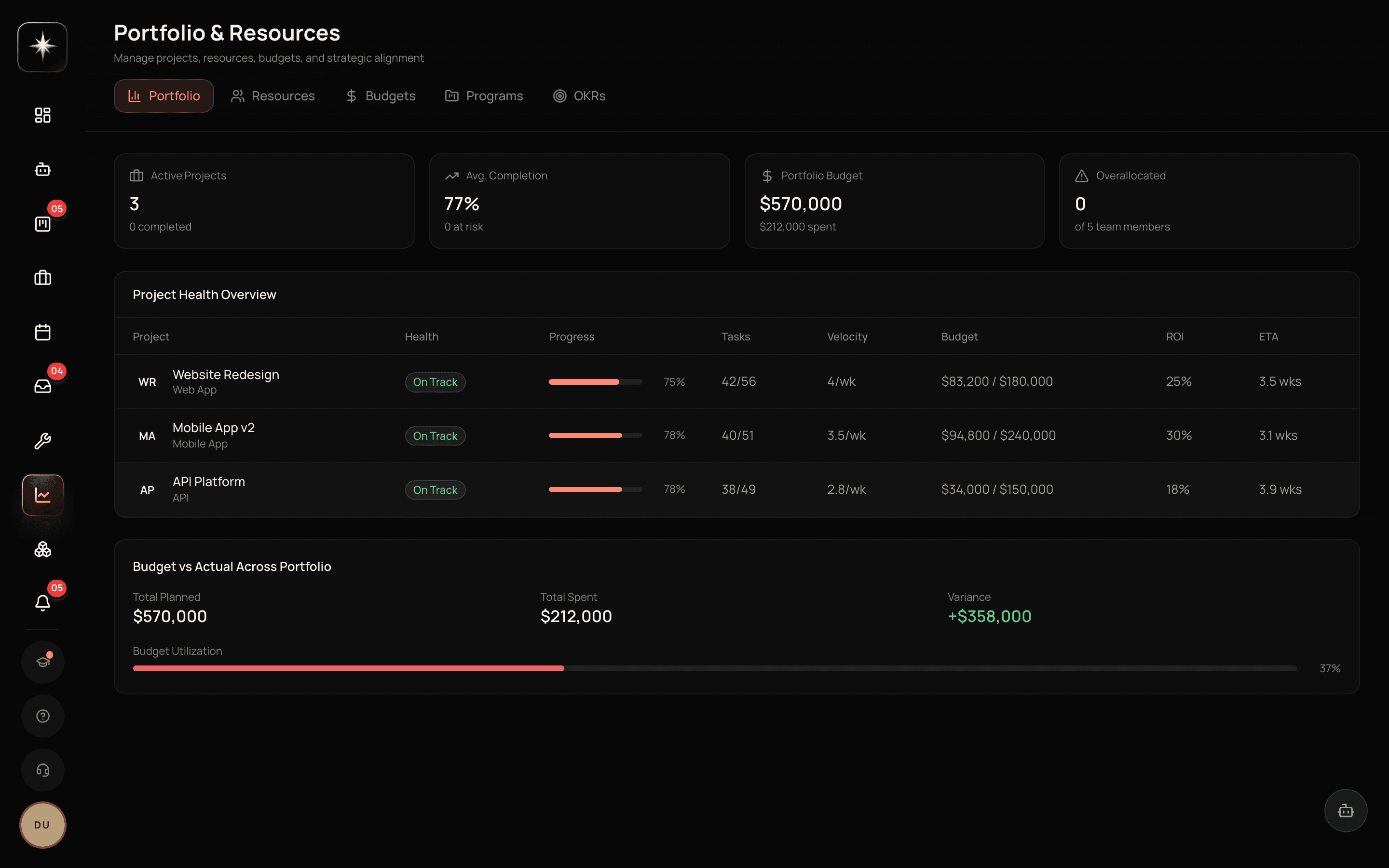
Budgets and forecasts
Budgets are per project and roll up. Forecasts project where you will land against them.
The useful discipline here is to treat the forecast, not the spend, as the number to watch. Spend tells you what already happened, which you cannot change. The forecast tells you where you are going, which you can — and the moment worth acting on is when the forecast crosses the budget, not when the spend does.
For client work, this is also where the connection to the client record pays off: a project over forecast on an account already marked At Risk is a different conversation from the same overrun on a healthy account.
The Resources tab
This is the tab to actually use.
It carries capacity, allocation, and team availability. Leaders can raise an availability request; members respond with what they have. There are also standing availability entries for regular patterns.
Everything downstream reads this. The sprint planner's capacity number comes from here. Assignment recommendations weigh it. Any statement about whether the team can take on more work is either built on this or is a guess.
So the operational habit is: raise an availability request at the start of each planning period, chase the responses, and only then plan. Planning first and collecting availability afterwards is the common order and it is backwards.
Allocation: finding the double-committed person
Allocation shows who is committed to what across projects. It is the surface that catches the specific failure that boards cannot: someone who is 60% allocated on two different projects, where each project's board looks entirely reasonable.
This is worth a deliberate check every planning period. The people it catches are usually the ones everybody wants — the person with the rare skill, the one who unblocks things — which is exactly why they end up over-allocated and why nobody notices until they become the constraint.
When you find one, the answer is a conversation about which commitment gives, made in advance. The alternative is that reality decides, usually badly, and usually at the end of the period.
Use the portfolio level
- 1
Group your projects into programs
Only where a leadership question spans them. Keep it shallow — projects, programs, objectives, stop.
- 2
Raise an availability request before planning
Resources tab. Do this first; planning before collecting availability is the wrong order and it is the usual one.
- 3
Check allocation for double-commitment
Look for anyone allocated across two projects. Each board looks fine; the person does not.
- 4
Watch the forecast, not the spend
The moment to act is when the forecast crosses the budget, which is earlier than when the spend does.
What to watch
- Availability response rate
- Share of the team who answered the latest availability request.
- Healthy signal: Most of the team. Below that, capacity is being extrapolated from a minority and every plan built on it is optimistic.
- Over-allocated members
- People allocated beyond their stated availability across all projects.
- Healthy signal: Zero, or known and deliberate. The unknown ones are the ones that become the constraint mid-period.
- Forecast-to-budget variance
- How far projected spend is from budget, per project.
- Healthy signal: Small, and acted on early. Waiting for spend to cross budget means acting after the decision was already made for you.
Key takeaways
- ·Programs answer leadership questions that span projects; keep the hierarchy shallow.
- ·Watch the forecast rather than the spend — it is the number you can still act on.
- ·The Resources tab is where availability is collected, and everything downstream reads it.
- ·Collect availability BEFORE planning, not after.
- ·Allocation catches the double-committed person that no single board can see.
Next: the reports themselves — the library, the Operating tab, and getting them delivered without anyone opening the app.